
Key Highlights
Welcome to your easy guide to google searches! In this guide, you will see what you can learn and how to make the most of google.
- Search operators are special commands that help you get better google search results.
- When you use these special commands, your search query can give you more specific information from google.
- You can type these commands in the search box and do an advanced google search.
- Some operators are basic and good for simple filters, and some are advanced for harder tasks.
- If you put together several operators, you make a targeted query which helps you find what you want faster on google.
Table of Contents
Introduction
Have you ever tried to look for something on Google, and it felt like trying to find a needle in a haystack? You know the info is out there, but your search query brings up pages of google search results that you do not need. This guide will show you search operators. These are your secret weapon for making the google search engine work better. When you know these commands, you can tell Google just what you want. This will make your web searches fast and spot-on instead of hard and frustrating.

Understanding Search Operators and Their Importance
Search operators help you find things faster in Google. You can use them to get more control over your search results. These are like a special way to talk to Google. When you add a search command to a search term, you make the results more focused. That way, you get closer to the information you want.
When you know how these operators work, you can cut out extra stuff and see only what matters to you. This can save you a lot of time. It also helps you get better information from the web. Let’s look at what these operators do and why they are important for good web searching.
What Are Search Operators?
So, what are search operators? These are special commands and characters you use in a search query. They help Google give you better results. You add them when you type something in Google. That way, you can find results from a certain website or look for an exact phrase.

These special commands help you narrow down your web searches. Some of the most helpful search operators are using quotation marks to find a phrase exactly as you type it. You can use the site: operator when you want to search within one website. The filetype: command helps you find certain types of files, like PDFs or documents.
Using these operators is easy. You need to add them into the search box with your search term. When you get good at using a few of these commands, you can make your searches much better. You will get what you want faster and spend less time looking.
Why Do Search Operators Matter for Web Searches?
You may wonder why you should take the time to learn these commands. The main reason is they help you be more efficient. There are billions of Google searches every day. The amount of information out there can feel like too much. Search operators help you find what you need faster. They let you skip all the extra results. This makes your web searches simple and useful.
Instead of going through many pages of search results that do not help, you can use an operator to find what you need. If you want a certain document, use a command in the search bar to help get it. Search operators are a good way to find files or documents right on a website that you want. For example, if you use the site: operator and the filetype: operator together in the search bar, this lets you find a PDF on a college website or get a PowerPoint file from a business site.
In the end, these operators let you have more say in your search. They help set search limits. This way, you get results that match your search term and what you want.
The Role of Search Operators in SEO
In the world of SEO, search operators are a must-have tool. People use them for many jobs like looking at what their rivals do, checking content, and finding ways to build links. With advanced operators, an seo professional can do technical audits. They also help people dive deep into google search results and pick apart the data with great care. These tools make searching in google and other search engine platforms faster and better, so anyone wanting to see more in search results should try them.
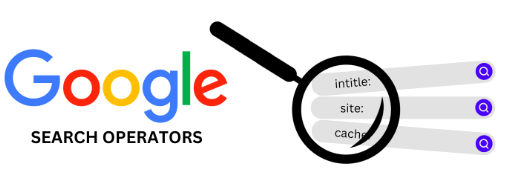
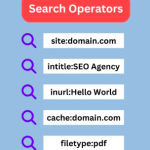
SEO professionals often use site: to find out if a website is indexed. They use intitle: to look at how competitors name their pages. The inanchor: command helps them see what anchor text appears in backlinks. These commands give you more details than a normal search and let you learn about anchor text, SEO, inanchor, and backlinks.
SEO experts use special search commands to spot problems, find new chances, and make the way they work better. With these commands, they can see pages that are not secure or learn who links to other companies. Search operators help people get the info they need so they can make smart choices and help a website do well.
Basic Google Search Operators
You don’t have to know a lot about computers to use search operators. The main ones are easy to pick up and you can type them straight into the google search box. These commands change the normal text searches a little, so you get more control over your google search results. You get the info you want, without things getting too tricky in google.

These basic search operators are the starting point for better searching. The operators can help you add or leave out certain words. You can also use them to look for exact phrases and group different search queries. Let’s see a few that many people use. These will help you make your everyday searches better and quicker.
Commonly Used Basic Search Operators
Basic search operators help you begin better searches. You add these simple tips or symbols to your search query when typing in the search box. One big difference between basic search operators and advanced ones is in how tricky they are. Basic operators make simple changes to your query. Advanced operators give you more control, like letting you search inside a specific url. Both tools make it easier for us to find what we want online.
These operators let you do things that you can’t do with a regular search. If you use quotation marks, Google will look for the whole phrase instead of just one word at a time. This is a good way to find the source of a quote or look up a product name.
Here are some of the most common basic search operators.
"search term": Use quotation marks to look for the exact words inside them. It gives results that have that search term together.OR: Use this to show results for one keyword or for another keyword. For example, you can usecats OR dogs.-: Put this before a word to leave it out from what you find. For example:jaguar speed -carwill show pages on jaguar speed but not cars.(): Use these to keep more terms or operators together. This helps you set how you want to search.
Simple Search Operators Examples for Everyday Use
Let’s take a look at how these easy commands can be used in your real life. Say you want to find information about content marketing. At the same time, you do not want to see anything about social media. You just have to type content marketing -social media in the google search box. This search command tells google to show all the results with your search term. But it will leave out anything that has “social media” in it.
If you want to pick between two phones, you can search for (iPhone OR Pixel) reviews on google. Putting words in parentheses groups them together. The word OR lets google show results for either the iPhone or the Pixel. This helps you get both in one search. It is faster than looking them up one at a time.
Using quotation marks can help you a lot when you search online. If you type “best chocolate chip cookie recipe” with the marks, the search results will show pages that have that exact line. This makes it easy to cut out the recipes that do not match and get what you want.
How Basic Search Operators Differ from Advanced Techniques
The main thing that sets basic search operators apart from advanced ones is what they do and how exact they are. Basic search operators such as " ", -, and OR work to change your text query but in a simple way. They help you add words, take words out, or look for exact phrases. This makes search results better, but only at the main level.
An advanced search operator helps you find what you want by focusing on certain parts of a webpage. You can use “intitle:” to look for words in the page’s title. With “inurl:”, you can search for words only in the URL. If you use “intext:”, you find words in the page’s body text. These ways of searching give you more control to get better results when you use a search operator.
Think of it like this. Basic operators are like a sieve with big holes. They catch the largest and most irrelevant results. Advanced operators are more like a sieve with very small holes. They help you filter with much more precision. Both can be useful. They just work well for different kinds of filtering needs.
Advanced Google Search Operators
When you want to do google search in a more exact way, advanced google search operators can help. There are commands that be used to look for things in some parts of a webpage. You can search in the title, the URL, or the file type with these. It is simple and fast to get what you want.
Using a search operator is easy. You type the search command into the search box. Advanced operators help a lot with SEO, research, and audits. These tools let you get the results you need without much extra work. Let’s look at the top advanced search operators. See how these can help you get better results.
Top Advanced Operators for Precise Results
Advanced operators help you find very precise search results. They do more than a simple keyword search. You can tell Google where to look on a page with these tools. A lot of Google’s search operators work well for this type of detailed filtering.
For example, if you want to find a PDF report about climate change on a government website, you can try using search operator keywords with advanced operators. A simple search like site:gov filetype:pdf "climate change" in Google will help you look for PDF files with the exact words “climate change” only on .gov websites. This shows how you can use an advanced search operator to get specific information fast.
Here are some of the most useful advanced operators you can use.
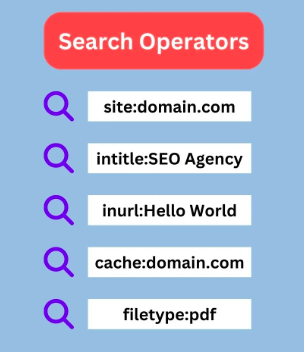
site:: This lets you search only one website.filetype:: You can make it show results with a file format like PDF, DOCX, or PPT.intitle:: This finds pages that have your word in the title.inurl:: Use this to search for a word or phrase in the page’s url.AROUND(X): It looks for pages where two words are close to each other by a set number.
Advanced Search Operators List with Practical Applications
The power of an advanced search operator really shows when you use it in real situations. If you are a student looking for information about renewable energy, you may first type a simple query like “solar power.” But, you can get better results by typing intitle:"solar power" "case study". This search operator helps you find pages where “solar power” is in the title and “case study” is on the page. This way, you get just the articles you need.
If you want to find a certain product manual, just type "product name" manual filetype:pdf in google search. This way, google will look for PDF files with the name of the product and the word “manual” in them. You should see the document you need in the google search results.
Another helpful search operator is allintext:. You can use this to make sure every word from your search will be in the body text of the page. For example, if you type allintext:healthy smoothie recipe banana spinach, you will get pages that talk about each of these things. This helps you find what you want when you search for a recipe that has all those ingredients.
Search Operators in SEO: Strategies for Experts
For SEO experts, advanced operators are handy tools they use every day. These help in the work they do, like technical audits and making a plan for content. The advanced operators help them to take a close look at their own sites and other sites. This can show good, useful details that people cannot see right away.
SEO professionals often use site: in google to see what pages are in google’s index. They use cache: to check the last time google saved a page. People also use inurl: to find pages that have a certain text in the url. For example, an SEO could type site:example.com -inurl:https to find all of the pages from that site that use http and not https and are still in google’s index or cache.
Other popular operators are related: and allintitle:. You can use related: to find other websites that compete. The allintitle: operator shows you how other people are naming their content with a certain keyword. When you use these advanced operators together, you can find guest post chances, see if there is the same content on more than one page, and spot good places for internal links. All these steps are important when you want your SEO work to be really good.
Combining Search Operators for Enhanced Performance
You can get the most out of google search when you use more than one search operator together. If you put two or more advanced operators or regular ones in one search, you will find google search results that match what you want very well. This is a way to tell google what you need in a much more clear way. You can use these tricks to make the search results work better for you without much extra work.
This way of doing things, known as “stacking” or “chaining,” lets you put filters together. You can use them to search for a certain type of file on a website. You can also look for files that came out in a set time frame. Let’s see how you and I can begin to use these strong commands together.
Step-by-Step Guide to Merging Multiple Search Operators
Combining more than one search operator is easy to do. You just add them in one search query on Google. Each operator works as another filter, so you get a more clear list with your query. This way, you can make what you want to tell Google more exact.
For example, say you want to read articles about “link building” on the Moz blog. You only want to find posts from 2024. To get the results that fit what you want, you should use advanced operators like site:, intitle:, and inurl: together.
Here’s a simple guide to get you started:
- Start with your main search term or keyword.
- Add your first operator. For example, use
site:example.comto show results only from that website. - Add another operator, like
intitle:"keyword", to help you find what you want faster. You can add more operators, such as-to remove some words orfiletype:to look for a certain type of file. - Make sure there are no spaces between the operator, the colon, and the search term. For example,
site:example.comis right, butsite: example.comwill not work.
Search Operators Examples: Synergizing for Powerful Queries
Let’s look at some useful ways to get good search results. If you want to find guest post chances in the marketing niche, a basic search may be too wide. Instead, you can make a search query like marketing intitle:"write for us" inurl:"guest-post-guidelines". This query helps you get pages that talk about marketing, have “write for us” in the title, and show “guest-post-guidelines” in the URL. That way, you find posts that fit well with your niche.
Here’s another example. Let’s say you want to look for presentations about AI from university websites. You can use an advanced search operator, like this: site:.edu filetype:ppt "artificial intelligence". This query helps you search only in educational domains that end with .edu. It looks for PowerPoint files with .ppt in them, and the files that have the exact words “artificial intelligence.”
You can also try mixing different keyword searches to see what is missing. For example, site:yourcompetitor.com intext:"your brand" -yourbrand is one good way to find pages on a competitor’s website that talk about your brand as a keyword, but do not use your brand name in the text. This trick may not always be perfect, but it can help you find interesting talks or comparisons about your brand.
Limitations and Best Practices When Combining Operators
While putting search operators together can help you find more in google search, there are a few things you should know. Some operators may not work as well with google anymore. A big example is the link: operator, which is not used now and gives results that may not be good. So you might get google search results that are not always right or the ones you want. It’s a good idea to know which google search features can still work well for your search results.
Another thing you need to know is, if you do a lot of complex searches on google quickly, google may ask you to solve a CAPTCHA. This is to make sure you are not a robot. It helps google stop bots from taking lots of info. Don’t feel scared. Just do the puzzle, and keep searching.
To get good results, begin with a simple query. Then, add one operator at a time. This will let you see how each one changes the results. It helps you know what each command does. Keep in mind that some operators may not work well together. Try different groups. This is the best way to find out what works for what you need. Experimentation is important.
Using Site Search Operators Effectively
The site: command is very helpful for people like site owners and those who do research. It lets you do a search that is limited to just one website. You use this operator when you type your query. This makes it easy to find something on a certain site. It is also good when you want to do a fast check of a website.
Instead of using the search bar on a site, you can type the site: operator in Google. This way, you get search results even faster, and sometimes they are better. Let’s see how the operator works and how to use it to find what you want on Google.
How the Site: Operator Works
The site: operator lets you tell Google to show search results from one website or domain only. It is easy to use. Just type site:example.com. You can use this tool to look through a whole domain like site:nytimes.com. Or you can check just a certain part of a site, like site:blog.hubspot.com. This is helpful when you want google to to look for something in a blog or any other place on a site.
You can use this operator to look for things on only one website. This works well if you read something before on a blog and want to find it again. It also helps you get a company’s contact page or see how many pages from your site are on google. Just type site:yourwebsite.com and you will get a list of all the pages google has from that site.
You can also use a search term to help find the content you want on a site. For example, if you type site:kinsta.com "WordPress security", you will see all the pages on the Kinsta site that talk about “WordPress security.” It is a fast and good way to look through large websites.
Site: Operator Examples for Targeted Results
The site: operator works best when you use it with other keywords and operators. This way, you can make a search query be very focused. It helps you find the most relevant pages on a specific website.
For example, when you work as an SEO professional, you may need to look for all blog posts on your site that talk about one keyword. This helps you spot places to link inside your blog. When you use a query like site:yourblog.com/blog "target keyword", it gives you a fast list of pages that you can use.
Here are a few more practical examples:
site:reddit.com "best coffee maker": This shows talk about the best coffee makers, but only on Reddit.site:yourcompetitor.com inurl:pricing: This helps you get the pricing page on a competitor’s site.site:amazon.com -inurl:product "customer reviews": These pages are about customer reviews on Amazon, but do not include actual product pages.site:twitter.com "your name" -inurl:status: This lets you see Twitter profiles that talk about a name. It keeps out single tweets.
Searching for Files and Documents on Specific Sites
Yes, you can use search operators to find certain files and documents. The best thing about search operators is that they help students, researchers, and anyone who works with information. The main trick is to use the site: operator together with the filetype: operator.
If you want to get an annual report as a PDF from a specific site, you can use Google in a simple way. Just type site:companywebsite.com filetype:pdf "annual report" in Google search. This helps you find files that are in PDF format with the words “annual report.” It only looks on the specific site you pick.
This way works well for different file types. You can use it to find Word documents with filetype:doc or filetype:docx, PowerPoint files with filetype:ppt, and Excel files with filetype:xls. This mix lets you find official papers, research studies, and resources. Some of these can be hard for people to find by using the main search on a website.
Specialized Search Operators for SEO Professionals
If you start with an SEO learning center or you work in seo, search operators can really help you. The advanced operators let you be more exact with your searches. You use them to check sites, look at competitors, and find content ideas some people miss.
These special search commands let you use Google in smart ways to find problems, see backlinks, and find where content is missing. These operators act like a free tool that helps you see how a site really works. They are good for anyone who does seo and wants to dig deeper into a site. Let’s look at some of the main operators you can use in your next seo campaign.
Essential Search Operators in SEO Campaigns
In a SEO campaign, data is very important. The fastest way to gather this data is by using search operators in google. People who work in SEO use special commands to spot problems and look for new chances. These search operators also help them see how google looks at a website.
A usual search command people use is site:example.com. This lets you see the rough number of pages that are in the index. If you see a number that is far off from what you think it should be, there may be a problem with pages getting indexed.
Another key operator you can use is intitle:. This helps you find out how your competitors put a target keyword in their titles.
Here are some of the most important search operators you can use for SEO:
- site:: You can use this to see if pages from a specific site are indexed. It also helps you find the content on that website.
- inurl:: This shows you pages that have a certain keyword in their URL. It’s handy for checking how a site or its URLs are set up.
- related:: Use this to find websites that are like your own or to spot direct competitors.
- “keyword”: To see where keywords show up as duplicate text. It also helps you find where your brand is mentioned but not linked.
Finding Website Issues and Debugging with Search Commands
Yes, you can use search operators in google search to help find website issues. These tools are good for seo experts and webmasters. They help you spot indexation errors and things like security issues fast. It is a good way to check for problems with google before you do anything else.
For example, you can use a search command like site:yourdomain.com -inurl:https in Google. This query will show pages from your domain that do not use HTTPS. It is important for SEO to find these insecure pages. Make sure to fix them.
You can also use a search query to check for files you do not want on the web. A search like site:yourdomain.com filetype:pdf will help you see all the PDF files that are on your site. If you find files with the query that should not be public, you have an indexing problem. You will need to use a noindex tag to fix this.
Locating Backlinks, Competitors, and Content Opportunities
Search operators can help you find ways to boost your site’s traffic and authority. A good way to spot your competitors is by using the related: search operator in google. When you search for related:yourdomain.com on google, you will see sites that google thinks are like yours.
You can use resource pages in your niche to get more backlinks. For example, you can search for [your topic] intitle:"resources" inurl:"resources". These pages put together the best links about a topic. If you have a good resource, you can reach out and ask them to include it. This can help you get quality backlinks.
You can also use search results to find websites that talk about your competitors but not you. Try a query like allintitle:review (competitorA OR competitorB) -yourbrand. This can show you which sites review others in your field but do not show your brand. You get a list of good places to reach out to for your own content or for building links.
Google Search Operators vs Other Search Engines
Google has the biggest worldwide market share for search engines. But it is not the only search engine out there. Bing and Yahoo also have many people who use them. This makes people ask one main thing. Do the search operators you use on Google also work on these other search engines?
The answer is both yes and no. A lot of the basic operators work on most search engine platforms. However, advanced operators can be different from one search engine to another. Your skills will help, but you may have to change how you ask your questions. Let’s go over some of the ways they are not the same.
Differences in Search Operators Across Major Engines
No, search operators do not always work the same way on every search engine. Google, Bing, and Yahoo might use some of the same operators, but each has its own way of writing and using commands. When you put in the same query on a different search engine, you can get search results that may not be the same. This means that the search engine you use can change what you get back.
Most search engines use simple operators. For example, you can use " " to find exact phrases. You can add - to leave out words that you do not want. The more advanced search tools, like allintitle: or AROUND(X), are often for google only. Bing has its own search tools as well. Some are like those found at google, while some are different and found only on Bing.
It is always good to check the official documents for each search engine. This helps you know what it can do. Here is a simple comparison of some common search engine operators.
| Operator | Bing | Yahoo | |
|---|---|---|---|
| “phrase” | Works | Works | Works |
| -word | Works | Works | Works |
| OR | Works | Works | Works |
| site: | Works | Works | Works |
| filetype: | Works | Works | Works |
T | intitle: | Works | Works | Works | | inurl: | Works | Works | Works | | related: | Unreliable | Not Supported | Not Supported |
Search Operators List Adapted for Yahoo, Bing, and Others
If you like to use search operators, you will be glad to know that you can use them on search engines other than google. Bing and Yahoo both let you use many commands. These can help you make your searches better. Keep in mind, the list of commands on these search engines is not the same as google’s.
Many core operators work in Bing. You can use site:, filetype:, and intitle: here. Bing also gives you some special operators. For example, you can use contains: to find pages that link to a certain file type. It is good to read through Bing’s documentation to know more about what you can do.
Yahoo’s search uses Bing. This means most search commands from Bing will work in Yahoo too. When you use any search engine, it’s always good to try things out for yourself. You can begin with basic commands like " " and -. After that, try some other commands to see what the platform lets you do.
Frequently Asked Questions (FAQ)
Learning about search operators may feel hard at first. A lot of people ask what the basic search operators are and how to use them well. You might want to know more about things like using the minus sign to leave out words or adding quotation marks to find exact phrases. These special commands can make your web searches much better. They help you get more relevant pages and exact search results. For more tips, you can visit SEO learning centers, which have ideas on how to use these search operators the right way.
Can you share examples of how advanced search operators work?
If you want to read blog posts about SEO from the year 2023, try using the search query SEO blog posts after:2022-12-31 before:2024-01-01. This is an advanced search operator for google search. It helps you filter google search results, so you get blog posts that were published in 2023. You will find more relevant content about SEO this way. This search operator works well for blogs and lets you see the related results you need.
Are there any limitations or retired search operators users should know about?
Yes, there are some limits with google search. Some old search operators, such as link: and info:, do not work well anymore. If you use too many complicated search commands fast, it may cause a CAPTCHA to come up. Because of these limits, you might see that google search results change or your search command stops for a short time by the search engine.
How do search operators help streamline the research process?
Search operators help you speed up research. They allow you to filter google search results with more accuracy. You do not have to go through things that are not useful. You use a search term with these operators to find exact phrases, file types, or content from a certain site. This makes the process much faster for students, journalists, and SEO professionals who rely on google.
What are Google search operators?
Google search operators are simple tools you can use right in the search bar. Each one is a command or a special sign that helps google know exactly what you want. You just add a search operator to your search term, and google gets a clear idea. This lets you make your search more focused. You get better results and find what you need faster.
For example, if you search for apple, you may get results about the fruit or the company. A search command in google can help you share what you want to find. You can use this for basic content research or for big technical seo audits. If you learn some of these, your searches on google will be a lot better and more focused.
46 Advanced search commands for Google search operators
Some search commands may not work as before. Google has removed some operators, and some do not work well now. The key is to know the search query tools that still work. When you use the right google commands and mix them, the query you make can be strong.
You do not need to memorize a long list of google search operators. It’s better to know the main operators and learn how to use them for real searches. Down below, you will see which google search operators always work, which have mixed results, and which have been removed by google. This can help you build your own list of advanced search operators that give steady google search results.
List of working Google search operators
To get the most out of Google, you should know which search operators work well now. These are commands that help you make your search query better and give you more accurate results. They go from simple changes to your query to special filters. Some of them can search in certain parts of a webpage.
The list of working Google search operators helps you find what you want in Google. These commands make it easy to get exact words, leave out certain terms, look inside a specific site, or choose files by type. Knowing how to use these will make you better and faster when you search with Google or do a google search. It gives you a strong start to using Google well.
List of unreliable search operators
It’s good to know about search operators that are not reliable. Google has not said they are gone, but sometimes they don’t give full or clear search results. When you use these, you might not always get what you want. So, be careful if you decide to use them for google or search results.
One operator you can use is inanchor:. It helps find pages that have certain anchor text in their backlinks. This one works at times, but it may not show all the results. Another tool is the related: operator. This one should help you find websites like your own. But at times, it can be off and not show your closest competitors.
The AROUND(X) operator lets you find words that are close to each other in google search results. But sometimes, it does not work well. These search operators can give us some help. Still, you should not use them for important research. Google search results change, so use these tools as extras, not your main way to search.
List of deprecated search operators dropped by Google
Google has stopped using some search operators over the years. These old search operators do not work anymore. If you try to use them, they will not change your google search results. It is good to know which ones are gone. That way, you do not waste time when you search on google.
One old search command that many people knew was link:. It was used to find pages that link to a certain URL. This search command was removed in 2017. Another one taken away is info:. It used to show some details about a specific URL or page.
Other old operators are not used now. The + sign was once used to find an exact match. It was replaced by quotation marks. The ~ sign was used to get synonyms. The cache: operator let you see the Google cached version of a page. But this was removed in early 2024. If you use these commands now, Google will just ignore them.
16 ways to use Google search operators for SEO
For people who work in SEO, google search operators are a free and strong tool. These help you check your own site. You can also use them to look at what your competitors do. They let you find new chances for content or links. The best part comes when you use more than one operator at once. This way, you get very exact google search results.
There are many ways you can use them for your seo work. Here are 16 useful things you can try right now. These examples can help you start. But feel free to try new ideas and mix things up on your own.
1. Find non-secure pages
It is important for the site to be safe for good SEO in google these days. Google likes sites that use https. If a page is not safe, browsers may tell the people who visit the page. You can use search operators to find the non-secure pages on the site that google has put in its index.
The command you want to use is site:yourdomain.com -inurl:https. This google query will look for pages from your website but leave out any page with “https” in the link. You will get a list of all pages that still use the old and not secure HTTP way.
If you see any pages that are not secure, you should check why they are not going to their HTTPS versions. Fixing this helps your site’s safety and makes people trust your site more. The same thing goes for search engines. It be good to use HTTPS for all pages.
2. Find plagiarized content
It is good to protect your own content. If other websites take your work without asking, it can hurt your standing and might lower your place in search results. You can use search tools to spot where your content has been copied online.
To try this, get a sentence or phrase from your article that stands out. Put that sentence or phrase between quotation marks. For example, type allintext:"a unique phrase from your content". You will get search results that show that text just as you wrote it.
By checking the results, you can find out if other sites use your content and do not give you credit. This helps you protect your work. It can also lead to new chances to share your content. If you see someone copying your text, you can contact them. Then, you can ask them to put a link back to your original source.
3. Find guest post opportunities
Guest posting is a good way to get backlinks and build trust. But, many people find it hard to find the best guest posting opportunities. A usual way is to search for your niche with phrases like intitle:”write for us”. This can help people find guest posts. But there are a lot of others sending pitches to the same websites. So it is tough to stand out.
A good way to find sites for guest posts in your niche is to look for guest bloggers who write a lot. Check where they have published related content. You can search something like seo inurl:author/neil-patel. This will show you blogs where that author wrote articles. You might discover sites open to guest posts that do not have a public “write for us” page.
This way, you can find better chances that are not so crowded. After you make a list of sites, you should check how strong and related they are. Then, you can send your pitch to them.
Find link building opportunities at scale
Finding good places to build links takes a lot of time in seo. But, if you know how to use the right search operator in google, you can make this easier. It helps to scale up the process. You do not have to look for sites one by one. Instead, you can type in some search terms and google will give you many options to work with based on what you are looking for.
No matter if you need resource pages, competitor backlinks, or help with linking in your site, search operators can help you do your work faster. When you make the right query, the search results show you a list of relevant pages from all over the web. These page results are where you start to get good backlinks and make your site stronger.
4. Find your competitor’s top pages for a specific keyword
It is important to know which content from your competitors gets the most attention. This helps you make your own plan better. You can use search operators with the right keyword. This will help you find their best pages. You see what works well. You also learn what kind of content gets backlinks and trust in the industry.
For example, if you want to find out which pages on Moz are doing well for the topic “link building,” you can enter site:moz.com inurl:link building in the search. The search results will show you the pages on their site that fit best with the keyword.
This lets you get a fast look at their top content for the topic. You can then study these pages to find out what makes them work well. Are they long guides, stories about a case, or pages for a tool? Knowing this can help you make your own content better.
5. Find internal linking opportunities
A strong internal link setup is important for good SEO. It helps Google see how your site is put together. Internal links can also move the authority of your site to more pages. You can use search operators to find easy ways to add new internal links on your own site.
To get this done, put a query like site:yourdomain.com "keyword or phrase" in Google. It will pull up every page on your site where that keyword comes up. You can look through these pages and check if they link to your main article about that topic.
For example, if you have a main page about “AI agents,” you can use the search site:yourdomain.com "ai agents". The search results will show you all the pages where you talk about AI agents. You can add links on these pages back to your main page, using words that make sense as anchor text. This will help make your main page stronger and give it more authority on the topic.
6. Understand your local competitor’s SEO strategy
For businesses that focus on local customers, it is important to know about your local competitors. You can use the map: operator to see where your competitors are on a map. This can help you see what their SEO plan looks like and if the market is too crowded.
If you type map:Mcdonalds in Google, you will get a map that shows where McDonald’s restaurants are near you. This helps you see all the places they have in your area. This is one good way to use google for local SEO.
While this operator gives you something to look at, it should be just the first step. When you check google search results for local searches, you can see which other businesses show up for top keywords in your area. From this, you learn who your competitors are and what they do. This info can help us make your own local listings and your content better. That way, you have a good chance to compete and show up higher in google search results.
7. Find credible sources for your articles
Using trusted sources helps people believe in your blog posts. Search operators let you find official papers, research, and other strong materials for your blog. The filetype: and ext: operators are two good ways to do this.
For example, if you want to find things on LLM training data, you can use the search query filetype:pdf llm training data. This will help get search results that show only PDF files. A lot of academic papers, whitepapers, and main reports use this format.
Getting information from government sites, colleges, or trusted research groups can make your content much better in terms of Experience, Expertise, Authoritativeness, and Trustworthiness (E-E-A-T). It will help people who read your article, and it also tells search engines that your content is well-researched and can be trusted.
8. Identify competitors in your niche
One good way to find other websites in your niche is to use the related: search operator. When you type this in google with a website, it shows you sites that google sees as close to that one. This is helpful if you want to do competitive analysis or learn more about the market.
If you have a website builder and want to find out who your main competitors be, you can search like this: related:wix.com. The search results will show other well-known website builders, such as Squarespace, Shopify, and GoDaddy.
This tool gives you a quick look, but you should know it may not always be right. It can sometimes leave things out or give you the wrong answer. Still, it is a fast and easy way to get a list of possible people or businesses you may have to watch out for. You can later use better tools to look into them more and know if they are the right ones to check.
Discover keywords driving revenue for your competitors with Keyword Gap
Knowing what works for your competitors can help you get ahead fast. When you look at their strategies, you may find a keyword gap. This means there are valuable keywords where they rank high, but you do not. These keywords can bring in lots of traffic and money. Finding and using these keywords is a big chance for your business.
You can use search operators to find out who your competitors are and what content gets the most attention. But SEO tools can help you do even more. These tools let you see the exact keywords your competitors use to bring people to their sites. The next sections will show how you can work with search operators to spot good शुरुआती chances in this area.
9. Find affiliate marketing opportunities
Finding chances for affiliate marketing can help you get more people to see your product. It can also help you sell more. If you see a website that talks about one of your competitors, they may be happy to talk about your product too. You can use search operators to look for these review sites.
The allintitle: operator is good for this. You can type allintitle:review (squarespace OR weebly) to find sites with reviews about Squarespace or Weebly. The search results will show you blogs and places that talk about your niche.
When you get this list, you can decide which sites to reach out to first. Try to find sites that have high authority and the people visiting there are interested in the content. If you pitch your product for a review to these sites, you may get good backlinks. You can also get referral traffic and some new customers. These related results are great for affiliate marketing outreach.
10. Find indexation errors
Indexation errors can hurt your SEO in a big way. This happens when pages you need in Google do not get indexed. It also happens if pages you want to hide appear in search results. You can use the site: operator to quickly check and find these issues.
To get a quick idea of the number of your indexed pages, you can search for site:yourdomain.com. This will show you the pages that Google has in its search right now. If the amount you see is much less or more than you expect, you need to check things out. For example, if it looks like only half of your blog posts are showing up, there may be an issue with your blog or its pages.
You can use this operator in google search to look for certain indexation errors. For example, you can type site:yourdomain.com filetype:pdf into google and see if any pdf files that should not be public are in the google search results. If some are found, you can take them out of the search results by using an x-robots noindex tag.
Advanced use cases for Google search operators:
When you get the hang of the basics, you can start using more advanced ways to work with google search operators. You will find that these let you change the search query in more detail. Sometimes, you might even build the url and its search query by yourself. This lets you have more control over the google search results than most people do.
These ways to use SEO are great for checking your website, doing research, and finding the information you need. They may feel hard at the start, but they work the same way as the easier tips do. Let’s take a look at these strong seo techniques.
11. Deep dive into Google search parameters
If you want the most control, you can make your own Google search using special text in the URL. When you use Google search, the URL at the top of your screen shows your query. Everything after the question mark “?” in the URL is important. That is where the real Google search happens.
The main thing you need is q=. This is where your search query goes. You use a + to separate words in the query. If you have other things to add, put them at the end of the URL. Each new parameter starts with an & sign. For example, as_qdr= is for setting date ranges, and as_rights= is for choosing usage rights.
When you know what these settings mean, you can make your own advanced google search URL. This lets you make a search that is very detailed and tailored to what you want. You will have more control over the google search results, which is hard to get if you just use the normal search tool.
12. Negative Keywords
Leaving out words from your search can help get better results. The minus sign (-) is the easiest tool to use for this. The minus sign works as a negative keyword with google. If you put it right before a word, google will not show pages that use that word in your search results.
If you type best headphones -wireless as your search term, you will see results for headphones. It will not show any that have the word “wireless.” This helps a lot if the search term can mean more than one thing. It also helps when you want to take out a group of products.
At a higher level, you can use the URL part as_eq= to leave out certain words. When you set up a search URL, this part works just like the minus sign. It makes sure that none of the words you name in the string show up in the search results.
13. Find results from specific dates
Finding information from a certain time is important for many types of research. Google has several tools to help you filter search results by date. The easiest the to use are before: and after:. These let you set a date in the YYYY-MM-DD format. For example, if you type Microsoft after:2024-01-01, Google will show you results about Microsoft that are from after that date.
If you want to look for a date range, you can use the .. sign between two years. For example, you can put Tesla 2020..2024. This is a quick way to find what you need for several years. It helps you get results from a set time, not just one year.
A simple but powerful way to limit search results in Google News is by using the as_qdr= part in the google url. You can choose a time range for your search, like the past day by typing d, a week with w, or a month with m. If you want, you can also pick several months, like m3 for the last three months. This helps you find fresh news and information in Google News.
14. Find pages with specific usage rights
When you want to find images or content on Google that you can use again, it is important to check the usage rights. Google gives you an advanced search option for this. It helps you find only the content that you have permission to use for your purpose.
You can do this by using the as_rights= URL parameter. It lets you filter google search results based on the level of Creative Commons licenses. For example, you can use it to find google search results that are free to use or share. You can also look for google search results that you can use, share, or change, even for work or business.
This tool helps people who make content, market stuff, and design things. It lets you find images, text, and other media. You do not have to worry about breaking copyright laws. When you use the right as_rights value in your search, you can feel sure that what you find is okay to use. It has the right permissions.
15. Do an allintitle search as a query string
The allintitle: operator helps you find pages where every word you type shows up in the title. You can use it in the search bar right away, or you can add it to an URL in a bigger query.
When you type a command into a URL, it goes right after your main query. If you search for “marketing” and add the allintitle part for “content strategy,” it shows up like this in the URL: q=marketing+allintitle%3Acontent+strategy. This helps Google to look for pages about marketing that also have “content strategy” in the title.
This way can be used with operators like allintext: to look for words in the page’s body text, allinurl: if you want to find words in the URL, and allinanchor: for text in the anchor text. You get more options with this method to shape your google search and sort your google search results to find what you want in the google search, body text, anchor text, or url.
16. Find products in a specific price range
When you shop online, you want to find things that fit your budget. Google has a way that helps you do this. You can use two dots (..) between two numbers to let Google show what is in that price range.
This can be good for helping people find products. For example, if you want a new smartphone that is from $300 to $500, you can search smartphone $300..$500. The operator works with different currency signs like dollar signs, pound signs, and more.
This command can be used for more than prices. You can use it for any number range, like dates or sizes. When you add other things like site:, it helps you narrow down your google search results. This is useful on shopping sites or any page that has numbers in the data on google.
Conclusion
If you want to get better at web searches and improve your seo, learning search operators will help a lot. These tools let you make your searches tighter, get good answers, and find details that you might miss. When you know the basic and advanced search operators, you can make research easier, spot link-building ideas, and help your content show up more. As you use the search operators in different search engines, you will get better at looking through the internet. If you want to boost your web searches and seo, try a free trial or talk with someone to learn more!
Frequently Asked Questions
Using google search operators?
Yes, google search operators be good for this kind of job. You can use a search query like site:reddit.com "lyrics of mysterious song" AROUND(10) "sample" to find talks on reddit. This blog post can help you make the right query and get better search results.
What Google Search Operators are and how do they work?

Google search operators are special commands you enter with your search query in the search box. These help google to filter and narrow down search results. They can make google look in one site or find an exact phrase you type.
Search engine w better search operators than google?

Google is the search engine that most people use. But there are other search engines like Bing and DuckDuckGo. These have special ways to search that can help you find what you want. You might get different answers or feel better about privacy on these sites. It can be good to try them if you want to go deeper with your search engine.
What are the search operators on reddit?
Search operators on Reddit are tools like “subreddit:”, “author:”, and “site:”. You can use these in a search to help get better results. For example, use “subreddit:” to look in one community. Use “author:” to find posts by someone. You can use “site:” to show posts from a website. This way, it’s easier to look for what you need and find good discussions on reddit.
Are there functioning search operators? – duckduckgo

Yes, DuckDuckGo has a few search operators. You can use the “site:” operator to search in a special website. The “filetype:” operator helps you find certain types of files. These can help you get better results on your search. Try these tips to get more exact answers when you use DuckDuckGo.
Best search engine for getting results?
If you want the search results to be more private, r/degoogle tells you to try DuckDuckGo or Startpage. These search engines focus on keeping your info safe. They do not track much of what you do, so you feel more secure when you look things up online. You will get good search results without giving up your privacy. Check out these choices if you want better security while using the web.
What are Google’s search operators?
Google’s search operators use special characters and simple commands. These help you make your searches more exact. You can use them to get closer to what you need. These handy tools help you narrow down what shows up, filter things you don’t want, and search for specific information on google. It helps to find the most relevant things quick and easy on the internet.
What are some famous Google search operators used in SEO?
Some well-known google search operators in seo are “site:”, “intitle:”, and “inurl:”. You can use “site:” to show pages from a certain website or domain. If you use “intitle:”, you get pages where the words are in the title. “inurl:” finds pages with the keyword in the url. These google search operators help you get more exact results when you look for something.
What is Google Search Operators? – Free Digital Marketing 1
Google search operators are special symbols and words you can use in your Google search. They help you to find the specific information you want. You use these tools to narrow down your results, filter out things you do not need, and do better searches. When you know how to use these google search operators, you can get what you need faster. This is really helpful, mostly in digital marketing. These google search tips make your work easier and save you time.


