
Key Highlights
- Find a list of free inventory software that works well for small businesses. These tools can help make your business easier to run.
- See how inventory management software lets you keep an eye on stock levels and can even automate stock tracking for you.
- Check out tools with things you need, like barcode scanning, low stock alerts, and support for more than one location.
- Learn more about open-source solutions and platforms that come with a mobile app, so you can run things from anywhere.
- Get to know the main differences between free and paid plans. This will help you know when it is the right time to pay for an upgrade.
- Pick up easy and useful tips on how to choose and use the right free inventory tool for your business.
Introduction
Handling your products the right way is important if you want to do well. An inventory management system helps you keep track of goods from when you buy them until you sell them. This makes sure you always have the right amount of items in stock. A growing business can get a lot of help from inventory management solutions that cost less and work well. The right tools can make your business operations simple, cut down on costs, and help stop you from running out of items. This boost in customer satisfaction is good for your business. Are you looking for a free inventory management system that fits what you need? Let’s look at some of the best inventory management options you can use now.
Best Free Inventory Software Solutions in India
Finding the right free inventory software may feel like a big task. There are many good choices, though, for small businesses in India. A lot of these tools help you with inventory management without costing a lot of money. You can keep track of your inventory levels and handle orders easily. The right inventory software helps make stock management easy and smooth, even if you are just starting out or running a small shop.
Effective inventory management helps you to run your business well and keeps your customers happy. The inventory management software we talk about here gives you what you need to begin. This includes real-time tracking and reporting. Let’s look at some free inventory management options and see how their features stack up.
1. Zoho Inventory – Free Plan Features and Highlights
Zoho Inventory gives you a free plan full of helpful features. It works well for small businesses and anyone just starting out. You use this cloud-based tool to handle your products and keep up with them on different sales channels. This way, you do not sell more stock than you have. The system is easy to use and lets you track stock from when someone places an order all the way until it gets to your customer.
Getting started with Zoho Inventory is easy. You can bring in your product data and start keeping track of your inventory right away. If you have a business in India, Zoho Inventory helps with GST compliance, so managing your taxes will be simple. The system is made to boost customer satisfaction and lets you handle order fulfillment with more accuracy and speed. It also works well with other Zoho apps and some point of sale systems. This helps your business feel more connected and smooth.
Key features of the free plan include:
- Track orders from start to end
- Scan barcodes easily
- Connect with many sales channels
- Get alerts when it’s time to reorder
2. Odoo Inventory – Open Source Advantages
If you want a customizable tool, Odoo Inventory is a good choice. This open-source inventory management software is free to use. Since it is open-source, you can change it to work well with your business needs. The system is made to help you get the most out of your supply chain and to keep your stock levels down.
Odoo uses a double-entry inventory system. In this system, every stock move is seen as a simple shift from one spot to the next. This way to work can help stop problems with stock levels, and it lets you see your inventory flow with ease. It does not matter if you run a small shop or a big company. Odoo can be set up to match the size of your work.
Here are some of its advantages:
- There are some advanced inventory control features.
- It can give you forecasting and reporting analytics.
- You will get customizable alerts and notifications.
3. Sortly – Easy-to-Use Free Inventory App
For businesses that want a simple and easy way while out and about, Sortly is a great pick. The mobile app is made to be easy for anyone to use. You can track your inventory, tools, and equipment from any place with your phone. If you ask, “Is there a free inventory management app I can use with my phone?” Sortly is a really good option for you.
The free plan is made for people and very small businesses. It lets you keep track of your inventory levels easily. You can use your phone to scan barcodes. This makes it simple to update your inventory data. The app also gives reports, like low stock alerts, so you can stay aware of your stock.
Sortly’s key highlights include:
- You can quickly add your old inventory.
- Scan barcodes and QR codes right on your phone.
- Get reports when you are low on stock or when there is new activity.
4. inFlow Inventory – Free Stock Tracking for Small Businesses
InFlow Inventory has a free plan for small businesses. The plan helps you start with professional stock tracking. It is a strong inventory management system that makes order management simple. The system can help you keep control of your products. If you want to stop using spreadsheets, this is a good first step for you.
To start using inFlow, download the software. You can then add your products and numbers for each one. The system lets you track items as they go through your business. This starts from purchase orders and ends with sales. You can also set up low stock alerts. This helps you know when you need to order more of what you sell most. It can stop you from running out and losing sales or making customers unhappy.
The free version provides essential features like:
- You can track the product and inventory to know what you have in stock.
- You can manage all the orders for sales and purchases with order management.
- The barcode can be made and scanned to help with tracking.
5. ABC Inventory – Robust and Free Desktop Solution
ABC Inventory is a free desktop software. It has many good features for inventory management. You install it on your computer, not on the cloud. This can be better for some businesses that want to keep their data safe. You can use this software to work with more than one warehouse. It helps you do many jobs needed for managing inventory.
The software makes it easy for you to keep accurate inventory records. You will find that it helps you with order processing and also lets you handle everything from purchase orders to shipments. With features like stock alerts, you get notified when inventory is running low, so you stay on top of things. When you compare popular free inventory management software, ABC Inventory stands out. It gives you a deep set of features even though it is a free desktop tool.
Some of its notable features are:
- You can manage more than one company and warehouse with this system.
- The system helps make order processing for both buying and selling easy.
- It gives automatic stock alerts and tells you when it is time to reorder.
6. RightControl – Free Inventory Software for Startups
RightControl gives you a free option called RightControl Lite. This is a good place to start if you have a startup or a small business. The software has all the main tools you need for inventory planning. You can keep track of your stock. You can also handle your contacts and work with sales and purchase orders. Everything is set up in one simple interface, so it is easy for you to use.
The free version of inventory software comes with some limits. It does not offer as many features as the paid versions. Still, it works well for simple supply chain tasks and supply chain management. The support you get from free inventory software providers is often different. Some have places to ask questions online or guides you can read. When you pay for a plan, you usually get better help, such as talking to someone on the phone or getting answers through email. With RightControl’s free version, you can start using the tool and see if it works for you before you buy a full plan.
The Lite version includes:
- Inventory control and stock management help you keep track of the items you have and use. This makes it easy to see what is in stock, what needs to be ordered, and how items move in and out.
- Invoice and order management lets you handle bills and keep up with orders. You can get, send, and keep track of all your invoices and orders in one place.
- Contact management for customers and suppliers keeps all their details in one spot. You can see who you work with, when you last spoke, and how you do business with them.
These features make it simple for you to use stock management, inventory control, and order management every day.
7. Stockpile by Canvus – Simple, Cloud-Based Free Tool
Stockpile by Canvus is a free, easy-to-use inventory management tool. It works in the cloud. This means you can see your inventory data from anywhere if you have the internet. The simple design makes it good for small businesses and groups that want an inventory system without lots of extras.
One thing people often ask is, “Can free inventory management software handle more than one location?” With Stockpile, the answer is yes. This software makes it easy to manage inventory management and warehouse management in more than one place.
It may not have seamless integration with every e-commerce platform. Still, it does a good job with basic inventory needs. The core features in the free inventory software help you keep track of what you have and where it is stored.
Stockpile’s features include:
- There be no limit on how many items, users, and locations you can put in.
- This has a simple reporting system.
- Different users will get different levels of access.
8. Sleek Bill Inventory – Free Edition for Indian Businesses
Sleek Bill Inventory gives a free version made for small businesses in India. The software helps you make billing and invoices easier. It also offers inventory management solutions that can help your work. A key feature of this tool is its built-in GST compliance. This lets you create GST-compliant invoices with no trouble. With Sleek Bill Inventory, you can handle your billing and inventory management tasks with ease and have what you need for GST compliance.
The free version is made for a business that is growing and needs simple tools. It lets you keep track of your stock and handle payments. It may not work with all pos systems, but the best part is how well it does invoices. If you need to send bills quickly and want to follow rules, Sleek Bill Inventory is a good pick.
The free edition allows you to:
- Create and handle invoices that follow GST rules
- Keep track of inventory levels
- Handle payments and make financial reports
9. PartKeepr – Free Inventory for Parts & Components
PartKeepr is an open-source inventory management tool. It is made for businesses that work with electronic parts and other small items. If what you have in stock includes raw materials or many tiny pieces, this free software can help you keep track of everything. The tool is great for electronics hobbyists and small makers. It is a good fit for those who want to manage their inventory of raw materials well.
Getting started with PartKeepr means you set up the software on your own server. This gives you control over all your data. The software helps you keep track of inventory levels. You can handle order fulfillment with it too. PartKeepr also lets you do cycle counting. Its clear design makes it work well for people in this area.
PartKeepr’s features include:
- You can track all your parts and components in detail.
- There is a parametric search that helps you find parts fast.
- You can manage distributors and keep track of orders.
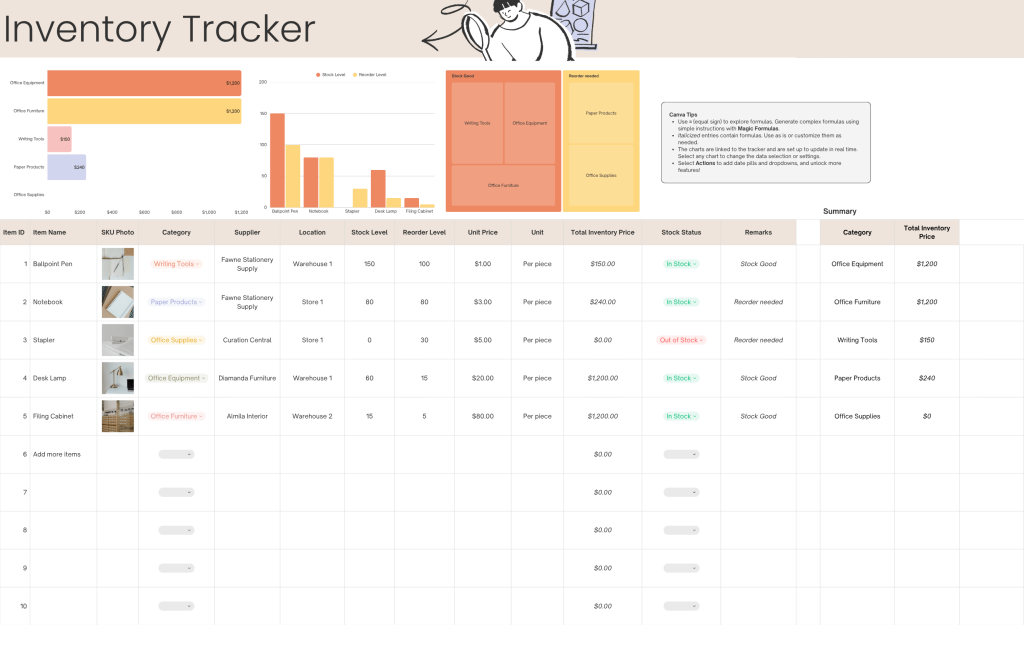
10. Microsoft Excel and Google Sheets – DIY Free Inventory Templates
For new businesses, the DIY inventory management way is easy and free if you use Microsoft Excel or Google Sheets. You get templates that you can change the way you want. This lets you build a simple system to track your inventory. Using it, you have full control over how you keep and look at your stock data.
This manual way of working has some limits. It does not have automation like special software does. This means there could be more mistakes, and it is harder to keep up inventory accuracy as your business gets bigger. Spreadsheets can help you see which features are important in an inventory tool, such as automated updates and stock alerts, but these features are missing here.
A spreadsheet-based system typically includes:
- A list of all products with SKUs.
- Columns for checking how much you have left.
- Formulas to work out the total value of all stock.
Key Features to Look for in Free Inventory Software
When you pick a free inventory management software, you need to know what key features you want. Free inventory tools will not offer every option you get with paid software, but they should give you what you need for the basics. Good inventory management software helps you keep an eye on your stock. It should offer ways to make tasks automatic and help you do less manual work. Look for simple features that make management easier and help your business save time and get better results.
Essential features usually have things like watching stock levels in real time, stock alerts when items get low, and basic reports. Being able to use barcode scanners can help you be more accurate. A simple order management system makes your sales go smoother. Let’s look closer at some of these important features, like order management, stock alerts, and barcode scanners.
Stock Level Tracking and Alerts
One of the most important things an inventory software can do is let you check stock levels in real time. When you know what you have on hand, you can manage inventory better. This helps make good choices for buying and selling, and keeps your inventory control smooth.
A great free tool can send inventory alerts. The tool lets you get notified when the stock levels for an item go below a set number. This simple and automated feature can help lower the risk of stockouts. If there is no more stock, the business may lose sales and the customers feel let down.
Getting started with this feature is easy for most people. The first step is to put in your starting inventory counts. The software then changes stock levels each time you record a sale or a purchase. This makes the inventory management process automatic. It helps save you time and stops mistakes that can cost you money.
Barcode Scanning and Item Management
Barcode scanning helps make work faster and is good for inventory accuracy. When you scan a barcode, you can quickly find a product, add the item to a sale, or change how many you have in your system. You do not have to type things by hand. This saves time and helps avoid mistakes.
Good item management starts with having detailed and correct inventory records. Barcode systems help with this by connecting the real product to its digital record. A lot of free inventory tools let you make barcodes or work with barcode scanners. This makes it easy to handle a lot of SKUs.
This feature is important for businesses that use point of sale (POS) systems. Free inventory software works well with POS systems and can use barcode scanning to keep inventory levels current. Every time there is a sale, your inventory levels change right away. This helps make sure the entire process—from the sales counter to your stockroom—is smooth and easy.
Multi-Location Inventory Support
When your business gets bigger, you may end up having stock in more than one place. You could have several stores or warehouses. A multi-location feature lets you keep track of your physical inventory in all these places at the same time. You can do this from one main dashboard. This makes warehouse management much easier and helps you see everything at once.
Many people want to know if free inventory software can work with various locations. The good news is, some tools can do this. A system like Stockpile lets you use this feature, even if you don’t pay. You get to see the amount of stock at every location you have. You can also move items from one place to another, and send out orders from the site that works best for you.
This feature lets you keep better track of stock levels in your whole business. You can stop one place from running out of items while another has too much. It gives you the freedom to handle your goods in a smarter way, wherever they are.
Free Point of Sale (POS) Integrations
For retail businesses, it is a big help to have a seamless integration between your inventory software and point of sale (POS) systems. These two systems can work together with each other. Your inventory levels will update in real time every time you get a sale. This means you do not have to take out sold items from your stock by hand.
This automation helps keep your inventory records correct. It also makes order processing run better. With this, your system shows exactly what you have in stock. So, what you see in your records matches what is on your shelves. This setup is key for good retail operations. It also cuts down on a lot of the office work you have to do.
If you want free inventory software that will work with POS systems, look into options that can link up directly or connect with APIs. A lot of free inventory choices do not offer many options, but Zoho Inventory has links that help join up your systems. This can give your business a more simple way to get your POS systems and inventory software to work together.
Mobile Accessibility and Inventory Apps
In today’s busy world of business, it is good to have your inventory system with you wherever you go. A mobile app lets you check and manage your inventory anytime. You can do this while you are in the warehouse, working on the shop floor, or meeting with suppliers. With this kind of mobile app, it is easier to keep up with business processes and to stay connected.
If you want to know if there is a free inventory management app for your phone, you are in luck. There are several free apps the company makes. A good example is Sortly. These apps let you do barcode scanning with your phone’s camera. You can make real time updates to your inventory and do it all without staying at your desk.
Mobile access helps you and your team work faster. You can use your phone or tablet to check stock levels. You can also handle orders and work with inventory tasks right on your device. This way, you have the flexibility to keep up with what your business needs in the moment. It’s a good tool for any group that must react fast when things change.
Comparing Free vs. Cheap Inventory Software Options
While free inventory software can be a good choice at first, it does have limits. The free inventory version will help you take care of simple jobs. But when your business gets bigger, you might need advanced features. With advanced features, you can keep working well and get better business performance. If you want to keep your business strong, it’s good to know when it’s time to move from free inventory tools to a paid plan.
Choosing if you should use a free tool or go for a paid plan comes down to what you need. A paid software often gives more detailed reports. It also connects with a lot more apps and offers better help to customers. Let’s look at the key features, so you can see when it may be a good idea to move up to a paid plan.
Feature Differences Between Free and Paid Plans
When you look at the features of popular inventory management software, you can see clear differences between free and paid options. Free versions give you basic tools, like stock tracking and manual order entry. These are good for people who just want to get organized. But they don’t have much automation or the deep features that a growing business will need.
Paid plans give you more tools for advanced inventory management. You can use features like warehouse management for more than one location. The software lets you know what items you will need by forecasting demand. You can also let the system make purchase orders for you. The advanced features of inventory management software help you connect with many e-commerce platforms and accounting programs. These features of inventory management software are made to help you use your warehouse and products in the best way, and show you more about how your business is really going.
Here is a simple look at what people usually get from free inventory management software compared to paid inventory management software.
| Feature | Free Plans | Paid Plans |
|---|---|---|
| Number of Users/SKUs | Often limited | Typically unlimited or higher tiers |
| Integrations | Basic or none | Extensive (e-commerce, accounting, POS) |
| Reporting | Basic summary reports | Advanced, customizable analytics and forecasting |
| Automation | Limited (e.g., low stock alerts) | Advanced (e.g., automated reordering) |
| Customer Support | Community forums, email | Priority phone, chat, and email support |
Limitations to Expect from Free Inventory Software
It’s good to know what the free inventory software can and cannot do. These tools can help you a lot, but there are limits. The free inventory software may let you use only a small number of users, products, or transactions. This can stop you from growing when your business gets bigger.
Another limit that often comes up is when the free plan misses advanced features and automation. You may have to do more steps yourself. This can lead to human errors. It also may hurt your inventory accuracy. If your sales channels do not sync by themselves, you might sell more items than you have. This can make customers lose trust and also lower your cash flow.
Support is usually just online forums or documents, so you may be on your own if there is a problem. These limits are normal when you choose a free tool. Knowing this helps you think ahead and see when your business is too big for its current inventory levels solution.
When to Consider Upgrading to Cheap Inventory Software
Deciding when to move from a free tool to a paid one is important for your business. If you spend a lot of time entering data by hand, or if you notice problems with stock numbers often, then it may be time to change. These issues can hurt your bottom line.
Think about moving to a better plan when your order management grows too hard for a simple system to handle. If you sell on more than one channel and have a hard time keeping your stock correct, it’s a good time to get a paid plan with strong tools that help things work together. A paid plan will also help if you want more details about your business performance. For example, you might need advanced ways to see your inventory valuation or want to use predictive analytics to tell what customers may do next. If you feel this way, it’s a good idea to try paid options now.
In the end, you need to look at what you get for your money. If using the free software takes up more of your time or makes you lose more sales than a low-cost paid plan, it is a good idea to change to the paid version. A small extra cost now can help your business down the road.
Practical Tips for Getting Started with Free Inventory Software
Ready to use free inventory software? The first thing you need to do is make your inventory management process simple. Take some time to pick the right inventory software and set it up well. This will help a lot in the long run. You will have more effective inventory management, and there will be fewer things to worry about.
Before you start, it’s important to know your business needs. Take time to look at your daily work, like getting new stock, sending out orders, and doing a stock transfer. This will help you choose a tool that fits your goals and supports what you do. Let’s go over some good tips to help you get started in the right way.
Choosing the Right Free Tool for Your Business Needs
The first thing you need to do when starting with free inventory software is pick the right one for your business needs. The free inventory tools out there are not all the same. Take some time to think about what you want to get done. Do you need to keep track of stock levels, or do you need order management features that can do more?
Think about the industry you are in and how much you sell. A small retail shop will not need the same tools as a small company making things. Be sure to think about what you want your business to become. A simple tool could be good for now. But will it grow with you and your team later? Read what other people have to say about these tools. Compare what each top choice can do before you say yes to one.
Knowing what your customers want is important. You need a tool that lets you follow sales patterns, even in simple ways. This will help you know the right items to stock. You should look for inventory management software that fits with how you work and lets you keep up with demand in a smooth way.
Setting Up and Importing Your Product Data
After you pick your software, you have to set it up. To start, you will need to put in your product details. A lot of free inventory management tools let you import your product list from a spreadsheet, like a CSV file. This is much quicker than entering each product by hand. With free inventory tools, you can save time and keep your data up to date.
To keep things simple, clean and sort your product data before you bring it into the inventory system. This means you need the same names for all items, special SKUs for each thing, the right numbers, and supplier details that are correct. A tidy data set is needed for the inventory system to work well. It also helps when we do cycle counting later, making those tasks better and easier.
After you bring in your data, spend some time to look at the features of the software. Set up stock alerts for when items run low. Make user accounts for your team. Get to know how the reporting dashboard works. Doing these steps the right way will help you get a seamless integration of this tool into your daily work.
Conclusion
To sum up, using free inventory software can help your business run better and save money at the same time. If you pick a solution that fits your needs, it will be easy for you to look after stock levels, keep track of sales, and even use things like barcode scanning and support for more than one location. There are many free inventory software options in the market. Take time to learn what they do and what they do not. Keep in mind, these free tools may have some limits. You might need to go for a paid upgrade one day. Do not worry about looking into the solutions from this blog to choose what is best for your own inventory management. If you feel ready for the next step, you can get in touch with us for a free talk with our experts. They will help you get the best inventory tools for your business and answer your questions about stock levels, barcode scanning, inventory management, free inventory, and business operations.
Frequently Asked Questions
Can free inventory software handle multiple warehouses and locations?
Yes, there are free inventory management options that help you keep track of items in more than one place. A tool like Stockpile lets you view and manage stock at various locations. This is helpful if you have more than one store or warehouse. Being able to do this is important for good warehouse management as your business needs grow.
Is my business data secure with free inventory management tools?
Security is not the same in all free inventory management software. Most cloud-based inventory management tools use encryption to keep your data safe. But, it is a good idea to read what each provider says about security. A reliable inventory system should put your order management and customer information first. This is true even if you are using a free inventory plan.
Are there free inventory apps compatible with mobile devices?
Yes! A lot of free inventory management software companies give you a mobile inventory app. You can use it on iOS and Android phones. Apps such as Sortly and Zoho Inventory help you handle stock levels and do stock tracking right from your phone. This lets you manage inventory management for your business while you are out and about.

